
Understanding where opting in applies
By opting in, employees choose to start saving into a workplace pension if they haven’t already been enrolled. As it’s one of your employer duties, we’ve provided guidance on how you can support your employees if they choose to opt in.
Key information
- This page explains what opting in is, when it’s used by your employees and why it’s important to make sure employees’ right to opt into your pension scheme is processed.
- We’ll explain how you can process your employee's opt-in request using your auto enrolment dashboard accessed using your online service login.
- You can also find information on how you can support your employee's opt-in request.
What is opting in?
Jobholders who aren’t automatically enrolled can choose to opt in to the workplace pension scheme. By opting in, they take an active step toward building their pension savings. As an employer, you must support this process as part of your legal duties under The Pensions Regulator’s guidance.
When can employees opt in?
There are two main scenarios when an employee may opt in:
- If they’re assessed as eligible jobholders and automatic enrolment is postponed, they can opt in during the postponement period.
- If they’re assessed as non-eligible jobholders, they can choose to opt in to the workplace pension.
Why is opting in important?
When jobholders opt in to your workplace pension scheme, they can start saving for their future sooner. This early action not only helps them build long-term financial security but also shows that you’re committed to supporting their financial resilience.
By encouraging your jobholders to opt in, you empower them to make informed choices and take a meaningful step toward a more secure and confident retirement.
Different types of workers
We've outlined what The Pensions Regulator means by eligible and non-eligible jobholders and what pension duties apply to each group. The Pensions Regulator describes the categories that determine whether you must automatically enrol someone into a workplace pension, allow them to opt in, or allow them to join a scheme.
Eligible jobholders:
- earn over £10,000 a year
- are aged at least 22 but under State Pension age
- working in the UK.
You must automatically enrol eligible jobholders into your scheme, and you're required to contribute to their retirement.
Non-eligible jobholders:
- earn over £10,000 a year
- are aged at least 16 but under 22 or have reached State Pension age but under age 75
- working in the UK
or
- earn less than £10,000 a year but more than £6,240
- are aged at least 16 but under age 75
- and are working in the UK.
If a non-eligible Jobholder asks to join your scheme, you must enrol them and pay regular employer contributions.
Entitled workers:
- earn less than £6,240
- are aged at least 16 but under age 75
- working in the UK.
If an entitled worker asked to join your scheme you must enrol them, but you aren't legally required to contribute to their pension.
What you should do when you receive an opt-in request
You should process any opt-in requests you receive through your auto-enrolment dashboard.
Jobholders can opt in by sending you a signed letter, or an email which includes the following statement "I confirm I personally submitted this notice".
Jobholders that have received a postponement notice can choose to opt in through logging into online service. They can find this on your scheme's dedicated employee hub and will need to have their postponement notice to hand.
You must ensure that all opt-in requests are entered into the system and keep the relevant opt-in notice for six years.
Opting an employee in through your auto enrolment dashboard (full run system)
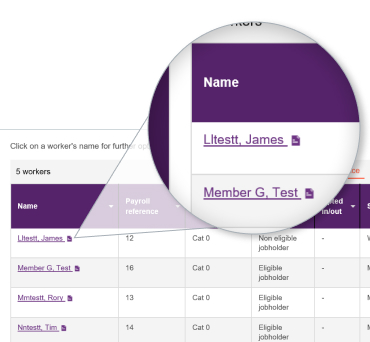
1. Find and select employee
Go to the Workforce tab and select the employee by clicking on their name.
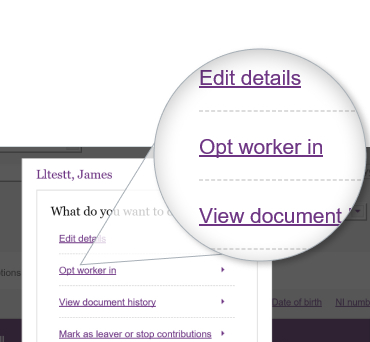
2. Click 'Opt worker in'
Select "Opt worker in" and enter the date on the opt-in request.
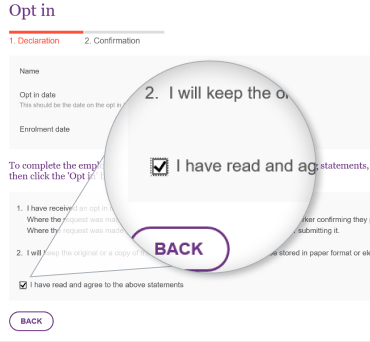
3. Confirm receipt of request
Tick the box to confirm receipt of the opt-in request and click "Opt in" to complete the process.
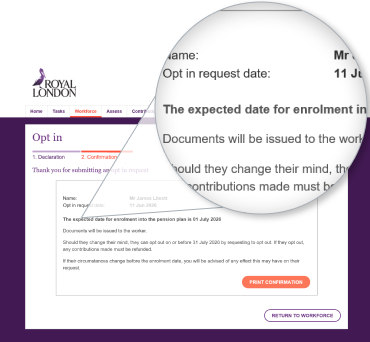
4. Opt in confirmation
The confirmation screen shows the enrolment date, and the employee's joining pack will be generated.
For payroll assessment system
If you’re using the payroll assessment system, on receipt of your employees notice to opt in, you’ll add them to your auto enrolment dashboard’s workforce tab in the usual way, you’ll select the reason for joining as ‘Opt in’. Our video explains how to add employees to your auto enrolment dashboard for those using the payroll assessment system.
Their first contribution will be due from the employee's next pay period. If you’ve agreed with the employee to back date their contributions, you should include any backdated contributions with their first contribution.
If your employee opts in online, then you’ll receive a task reminder on your auto enrolment dashboard as you’ll need to update your payroll systems to start making contributions for them.
You can find out more about this and other payroll updates on the auto enrolment dashboard video Making payroll updates.
It’s important to remember that under The Pensions Regulator's rules for automatic enrolment if a non-eligible jobholder chooses to start contributing by opting in, you must make an employer contribution on their behalf. This rule also covers eligible jobholders that are postponed.
More resources to help you manage your scheme members