
No changes to employees' pension plan details
It's easy to tell us you have no changes to make.
We'll process your employee's statements as soon as we've received your final payment for the review period.
What you'll need
- To get started, you'll need your administrator login details for online service (opens in a new window).
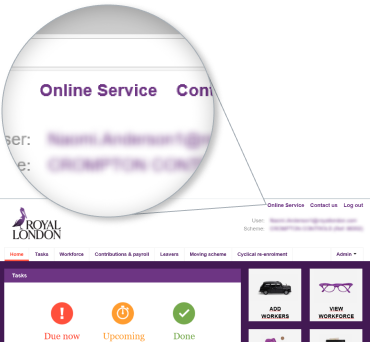
1. Select 'Online Service' on the auto enrolment dashboard
Once you have logged onto the dashboard, you can find 'Online Service' on the top right hand corner of the page. above the Royal London logo.
2. Click on 'Scheme information'
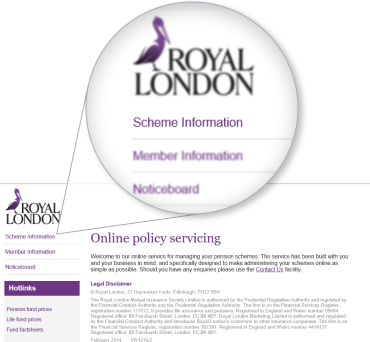
'Scheme information' is the first link displayed on the left hand side menu, just underneath the Royal London logo.
3. Select 'Online Service'
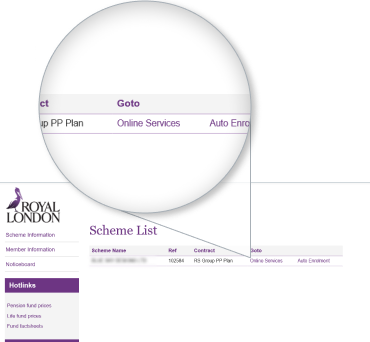
On this page, you will find the link 'Online Service' below the title Scheme List, to the right, next to 'Contract'.
4. Select 'Yearly Review changes'
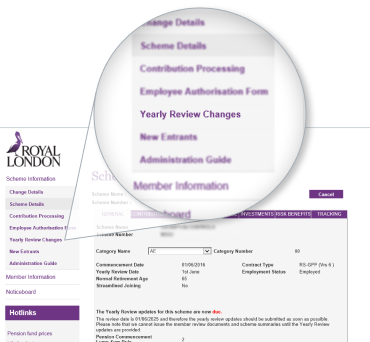
To being, select 'Yearly Review Changes' from the left hand side menu. This is the third link from the top of the 'Scheme Details' section.
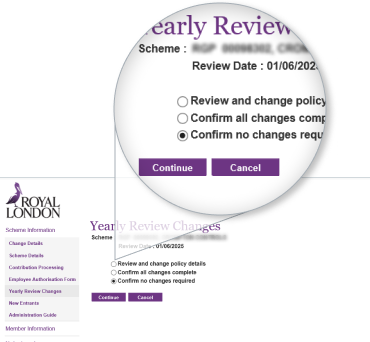
5. Confirm no changes are required
You will be presented with 3 options. Select 'Confirm no changes required'. Click 'Continue'.
Frequently asked questions
How do I find the 'Online Service' link?
From your dashboard you'll click 'Online Service' at the top of the page. Then navigate to your scheme list by hitting 'Scheme information' on the left of the page. The 'Online Service' link will be in your scheme list, to the right, next to the 'Contract' column.
I have a ‘Registration in progress’ message and can’t proceed, what should I do?
For system access issues, contact our employer helpline on:
- Phone 0370 850 1986
- Open Monday to Friday 8am–6pm
How do I access the Yearly review changes section?
Select 'Yearly review changes' from the left-hand side menu under 'Scheme details'. It is the third link from the top.
The Yearly review changes section is missing, what do I do?
Contact our employer helpline on:
- Phone 0370 850 1986
- Open Monday to Friday 8am–6pm
What should I do if there are no changes required?
You will be presented with three options on the Yearly Review Changes screen. Choose 'Confirm no changes required' and click 'Continue'.
What should I do if there are changes required?
If you’ve changes to make to your employees’ information visit our Updating employees’ pension plan details for a step by step guide.
What should I do if the option ‘Confirm no changes required’ is missing?
You should check the review date displayed on this page and if it’s been longer than six weeks since you’ve processed the final pension contribution for the review period ending on this date, then the review will automatically complete as a no change review.
Review statements will be sent based on the information we already have. If you didn’t have any changes to make there’s nothing more to do.
For example, if your review date is 1 April and you processed the contribution based on your March payroll on 15 April, your review will automatically complete if you’d not confirmed this by the 27 May.
Who should I contact if I’ve further questions about the yearly review?
If you have any other questions about your scheme, please contact your dedicated Corporate Servicing Team.
More resources to help you manage your scheme