
Auto enrolment pension postponement: rules, periods, and notices
Postponement is the process of delaying when you perform employee age and earnings checks for automatic enrolment by up to three months.
Key information
- On this page we’ll discuss the ways postponement can be used on workplace pension schemes.
- It’s a useful guide that can help you decide how you use postponement when setting up your scheme, if you’re trying to understand how your current scheme is set up or looking to update your scheme postponement rules.
- We’ll provide examples of the ways it can be used and give you information on where to get further support.
What is postponement?
Postponement can be used to delay the point at which an employee’s age and earnings are assessed. You can postpone your employees for up to a period of three months from the date they started working for you or after they become eligible to join the scheme because of their age or earnings or the date they meet the conditions for becoming an eligible jobholder.
Why might postponement be used?
Postponement helps you flexibly manage the enrolment of your employees into your pension scheme, while remaining compliant with your legal duties.
This flexibility can sometimes help simplify the enrolment process and better manage workforce changes.
Here are some common reasons why you might choose to use postponement:
- Temporary or seasonal staff
Using postponement you can avoid enrolling workers who are expected to leave within three months.
- Probationary periods
Postponement gives you time to confirm that new employees will remain with the business before starting pension enrolment. Where probationary periods are longer than three months, you'll be expected to auto enroll employees if they meet the conditions for becoming an eligible jobholder.
However, you'll be required to make pension contributions for employees that opt in during their probationary period.
- Payroll alignment
You can use this postponement period to align your employee's first contribution with their first pay, simplifying contribution calculations.
- Fluctuating earnings
Using postponement helps avoid enrolling employees who normally earn less than the earnings threshold but whose pay temporarily exceeds this because of bonuses, overtime or other spikes in pay.
- Scheme setup time
Postponement provides additional time to set up a compliant workplace pension scheme before enrolling your employees.
However, you'll still need to communicate to your employees of their right to join the pension scheme within 6 weeks of your schemes expected start date.
What are your responsibilities?
If you use postponement, you need to tell your employees about this within six weeks of their first day of employment or the date they met the conditions to be an eligible jobholder, whichever is relevant.
You must tell your employees in writing that they're being postponed. This is called a postponement notice. If you don't write to your employees to tell them in the required timeframe, you'll need to calculate and make any backdated contributions to cover the period that employee should have been enrolled in your scheme.
You'll need to tell your employees that they'll be enrolled from the date they would have become an eligible jobholder if postponement had not been used. You'll need to agree with them who will cover the costs of the backdated contributions. You can read more about this on The Pensions Regulator's website (opens in a new window).
Eligible jobholders
As defined by the Pensions Regulator, eligible jobholders:
- earn over £10,000 a year
- are age 22 or over but below State Pension age
- are working in the UK.
You must automatically enrol eligible jobholders into your scheme, and you're required to contribute to their retirement.
For more detail on the different types of employees for auto enrolment, please read the FAQs.
When can postponement be used
There are three points when you can use postponement:
- When you hire your first employee and need to put a new workplace pension scheme in place.
- An employee's first day of employment (new entrants).
- When someone becomes eligible for your pension scheme because they're old enough or earn above the contribution threshold (monitoring).
You can use different postponement rules at each stage depending on how you onboard your employees and how your payroll works.
Example timelines
We’ve created examples to illustrate the effects on your duties timeline if you use postponement. Our examples are based on:
When you first start your workplace pension scheme
- Your first employee starts work on 8 January.
- You’re within five months of your first employees' start date.
- Your monthly payroll running from the first to the end of the month.
- Calculating pay and paying staff on the 28th of the month.
- Contributions deducted from pay will be received by your pension provider no later than the 22nd of the next month, to comply with the pensions regulation.
For a new employee
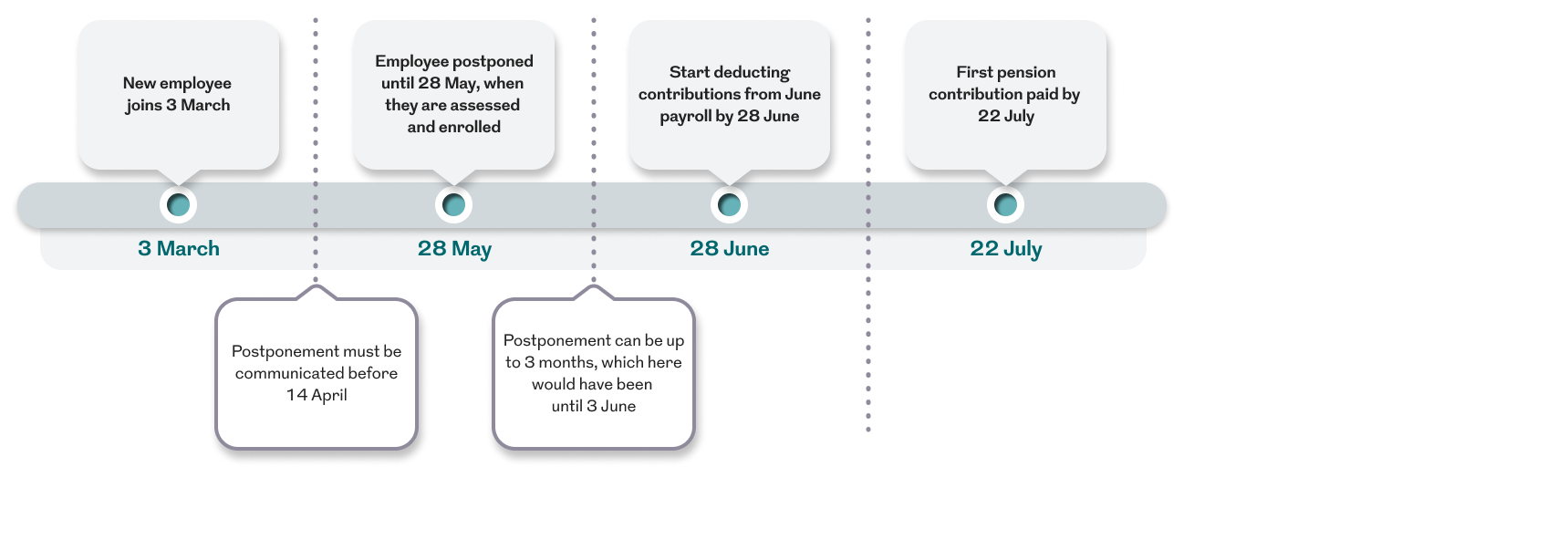
- The new employee starts working with you on 3 March.
Using monitoring
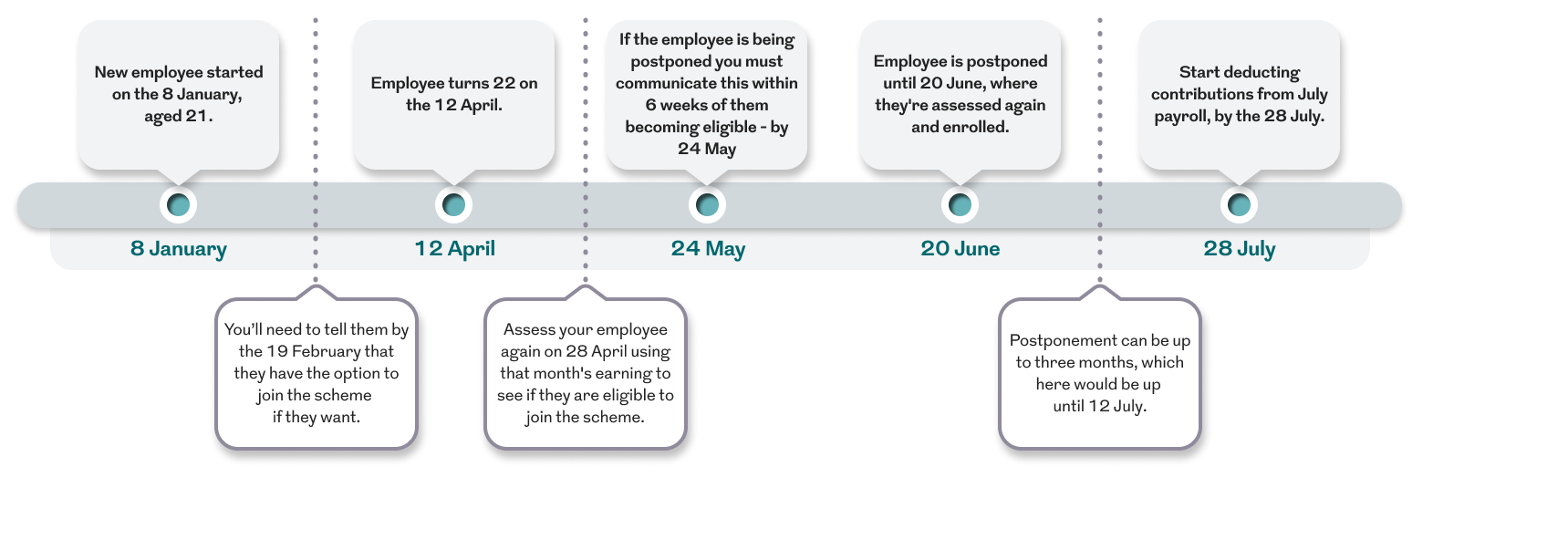
- An existing employee turns age 22 on 12 April.
Depending on who you set up your pension with, the scheme rules may mean you don't need to deduct your employees' first contribution until their first full pay. We’ll use this rule in the examples below:
Using postponement
At the start of your workplace pension scheme
When you hired your first employee on 8 January, you chose to use postponement for their workplace pension. Here’s what happens next:
1. You must tell the employee about postponement by 19 February (within six weeks of their start date). In this case, you told them on 15 January that postponement would last until 28 March.
2. In March, you’ll check how much the employee earned that month to see if they qualify for the pension scheme.
3. If they qualify (based on March earnings):
- Start taking pension contributions from their April pay
- Make these contributions either
- Shortly after their 28 April payday, or
- By 22 May at the latest
4. Finally submit your declaration of compliance to The Pensions Regulator by 8 June.

Click to enlarge image (opens in a new window)
Postponement for new employees
1. For new starters using postponement (example 3 March):
2. Tell them by 14 April (within 6 weeks) they’re postponed until 28 May
3. Assess May earnings on 28 May
4. If they qualify:
a. Take first contribution from June payroll (28 June)
b. Pay these by 22 July at the latest
Click to enlarge image (opens in a new window)
Postponement at monitoring stage
1. A new employee starts work on 8 January, aged 21 and is therefore not eligible for auto enrolment
2. Their birthday is 12 April, when they turn 22
3. Assess April earnings on 28 April, to see if the employee qualifies for auto enrolment
4. If the employee is being postponed, then you must communicate this to them by 24 May (within 6 weeks of the date of their 22nd birthday)
5. Postponement can be up to 3 months, which here would be up until 12 July
6. The employee here is actually postponed until 28 June
7. Take first contribution from July payroll and pay this by 22 August at the latest.
Click to enlarge image (opens in a new window)
Some final points on postponement
Postponement doesn’t apply when:
- You’re late in complying with your duties, for example not notifying your new employee that you're using postponement within six weeks of the day they started working for you.
- You’re assessing workers as part of your re-enrolment.
Need more help?
If you’re setting up a scheme for the first time and you’re considering if postponement is right for your scheme, you should speak to a financial adviser.
If you have any questions about your scheme with us, you should contact your Corporate Servicing Team. If you don't know who they are, you'll find their details by clicking the Contact us link at the top right of every screen on your dashboard.
Frequently asked questions
What is auto enrolment pension postponement?
Auto enrolment pension postponement lets employers delay the assessment of employees for their workplace pension for a short time. It’s often used to simplify admin or align auto enrolment with payroll schedules.
What are the different types of employee as defined for auto enrolment?
The pensions regulator sets out your employee duties based on their age and earnings, they will tend to fall into one of these groups:
Eligible jobholders:
- earn over £10,000 a year
- be aged 22 or over but below State Pension age
- working in the UK.
- You must automatically enrol eligible jobholders into your scheme, and you're required to contribute to their retirement.
Non-eligible jobholders:
- earn over £10,000 a year
- are aged 16 or over but under 22 or State Pension age or over but under 75
- working in the UK
or
- earn less than £10,000 a year but more than £6,240
- are aged 16 or over but below 75
- and are working in the UK.
If a non-eligible Jobholder asks to join your scheme, you must enrol them and pay regular employer contributions.
Entitled workers:
- earn less than £6,240
- be aged 16 or over but below 75
- working in the UK.
If an entitled worker asked to join your scheme you must enrol them, but you aren't legally required to contribute to their pension.
How long can auto enrolment pension postponement last?
Employers can postpone auto enrolment for up to three months. After this, they must check eligibility and enrol anyone who qualifies.
When is auto enrolment pension postponement allowed?
You can apply postponement:
- When you hire your first employee and need to set up a workplace pension for them.
- When a new employee joins.
- When an existing employee becomes an eligible jobholder.
What is an auto enrolment pension postponement notice?
This is a formal letter or email telling employees their assessment for auto enrolment has been delayed. It should explain:
- The postponement period end date.
- Their right to opt in to an automatic enrolment scheme for jobholders and the right to join a pension scheme for entitled workers during this period.
More resources to help you manage your scheme